
Overview
Use this guide when Uptime shows Never seen for an asset you expect to be reporting. Check whether a device is linked and whether Perspio has recorded its first communication.
Prerequisites
You need access to Uptime and to the asset’s Snapshot. An administrator can check the linked device’s Health tab if your access stops at the device list.
Step-by-step instructions
- Confirm the result in Uptime. Open Assets, select Uptime, and open Overview. Pick the day you want to check on the Asset Health chart. Select Never seen and use Search assets to find the asset. Confirm the row’s Status and check whether Last Contact shows Never.
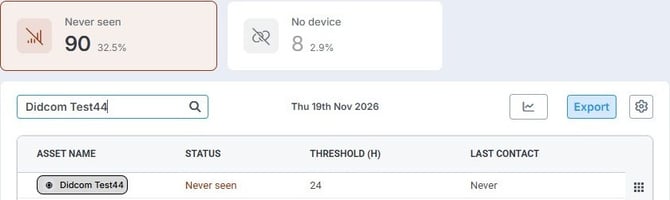 Start with the daily table. This test asset shows Never in Last Contact.
- Check for a linked device. Select the asset name to open its Snapshot. In the right-hand toolbar, select Devices. If a device appears, open it and select Health. If the list is empty, follow What to check when Uptime shows No device.
- Look for first contact. In Device Status, check Last Communicated Utc. In the test case below, the field is not set, which matches the Never result in Uptime. If a timestamp is present, compare it with the selected UTC day. The device may have started reporting after the day you selected.
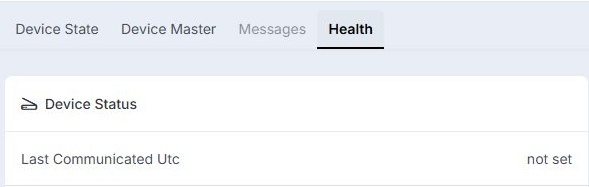 On thedevice’s Health tab, check Last Communicated Utc. In this example, it is not set.
- Follow up if you expected a check-in. Ask the person responsible for the device to confirm installation and when it was expected to report. Share the asset name, selected UTC day, and what Last Contact and Last Communicated Utc show. If the screens disagree and the dates don’t explain it, share both results with your administrator or Perspio Support.
Tips & troubleshooting
- Never seen calls for a first-contact check. If the asset has reported before and Uptime shows Unhealthy, verify the earlier communication gap and the latest contact.
- If the device’s Health tab is unavailable, ask an administrator to check Last Communicated Utc. See Device Health.