---
title: Setting Up Multi Factor Authentication, No Mobile Registered
description: This article guides you on how to set up Perspio's MFA when no mobile phone is registered in the platform.
---

[Skip to content](https://help.perspio.io/help/setting-up-multi-factor-authentication-no-mobile-registered#main-content)

English

Show submenu for translations

![Screenshot_3-4-2025_17232_](https://help.perspio.io/hs-fs/hubfs/Screenshot_3-4-2025_17232_.jpeg?width=200&height=53&name=Screenshot_3-4-2025_17232_.jpeg)

Open main navigation

Close main navigation

- English
  
  Show submenu for translations
- [Contact us](mailto:servicedesk@perspio.io)

[Contact us](mailto:servicedesk@perspio.io)

 How can we help you?

- There are no suggestions because the search field is empty.

1. [Perspio Help Centre](https://help.perspio.io/help?hsLang=en)
2. [Introduction](https://help.perspio.io/help/introduction?hsLang=en)
3. [How to's](https://help.perspio.io/help/introduction?hsLang=en#how-tos)

# Setting Up Multi Factor Authentication, No Mobile Registered

## This article guides you on how to set up Perspio's MFA when no mobile phone is registered in the platform.

#### 1. Type your user and click Log In.

![Click on Login](https://images.tango.us/workflows/4c0ff26a-349e-40b1-ae9f-45506a5acaec/steps/1340c6b6-e7c0-4b49-bcdc-79aa3c1c17cb/f2963bef-ff04-4c8e-a9b3-55d4e8281666.png?fm=png&crop=focalpoint&fit=crop&fp-x=0.1668&fp-y=0.4117&fp-z=1.9152&w=1200&border=2%2CF4F2F7&border-radius=8%2C8%2C8%2C8&border-radius-inner=8%2C8%2C8%2C8&mark-x=128&mark-y=359&m64=aHR0cHM6Ly9pbWFnZXMudGFuZ28udXMvc3RhdGljL2JsYW5rLnBuZz9tYXNrPWNvcm5lcnMmYm9yZGVyPTQlMkNGRjc0NDImdz01MTEmaD03MSZmaXQ9Y3JvcCZjb3JuZXItcmFkaXVzPTEw)


### 2. Enter your password and click Sign In.

![Paste input](https://images.tango.us/workflows/4c0ff26a-349e-40b1-ae9f-45506a5acaec/steps/e71a8807-c8d4-4852-a524-5ecd56736ce0/95ed248f-3815-4ffe-8b5a-47086b587aba.png?fm=png&crop=focalpoint&fit=crop&fp-x=0.5000&fp-y=0.4501&fp-z=1.8752&w=1200&border=2%2CF4F2F7&border-radius=8%2C8%2C8%2C8&border-radius-inner=8%2C8%2C8%2C8&mark-x=338&mark-y=362&m64=aHR0cHM6Ly9pbWFnZXMudGFuZ28udXMvc3RhdGljL2JsYW5rLnBuZz9tYXNrPWNvcm5lcnMmYm9yZGVyPTQlMkNGRjc0NDImdz01MjUmaD02NSZmaXQ9Y3JvcCZjb3JuZXItcmFkaXVzPTEw)


### 3. Read carefully the instructions and click Next.

![Click on Next](https://images.tango.us/workflows/4c0ff26a-349e-40b1-ae9f-45506a5acaec/steps/e0585ac8-febf-4b17-9a0c-8b5c3a7ee4dd/5078652a-d8b0-4feb-8765-5e1179fcb8f4.png?fm=png&crop=focalpoint&fit=crop&fp-x=0.5000&fp-y=0.5000&w=1200&border=2%2CF4F2F7&border-radius=8%2C8%2C8%2C8&border-radius-inner=8%2C8%2C8%2C8&mark-x=650&mark-y=435&m64=aHR0cHM6Ly9pbWFnZXMudGFuZ28udXMvc3RhdGljL2JsYW5rLnBuZz9tYXNrPWNvcm5lcnMmYm9yZGVyPTMlMkNGRjc0NDImdz05MSZoPTMxJmZpdD1jcm9wJmNvcm5lci1yYWRpdXM9MTA%3D)

### [You will be redirected to Microsoft My Sign Ins.](https://mysignins.microsoft.com/api/post/registerMfaMethods?x-client-Ver=4.13.1&x-client-SKU=msal.js.browser&culture=en-GB&authMethods=412&authMethodCount=1&isGatewayIAMUXRedirect=true)


### 4. Select your country and enter your mobile number. For Australia, enter the phone number without the first '0'.

![Click on Next](https://images.tango.us/workflows/4c0ff26a-349e-40b1-ae9f-45506a5acaec/steps/c4132725-7c8e-4b3f-b7d2-d6b742acdc99/5fafa985-1877-4f64-b894-e8f4358f2784.png?fm=png&crop=focalpoint&fit=crop&fp-x=0.4970&fp-y=0.3984&fp-z=2.0000&w=1200&border=2%2CF4F2F7&border-radius=8%2C8%2C8%2C8&border-radius-inner=8%2C8%2C8%2C8&mark-x=1004&mark-y=614&m64=aHR0cHM6Ly9pbWFnZXMudGFuZ28udXMvc3RhdGljL2JsYW5rLnBuZz9tYXNrPWNvcm5lcnMmYm9yZGVyPTQlMkNGRjc0NDImdz0xMzgmaD02MyZmaXQ9Y3JvcCZjb3JuZXItcmFkaXVzPTEw)


### 5. You will receive a Code via SMS. Enter the code and click Next.

![Click on Next](https://images.tango.us/workflows/4c0ff26a-349e-40b1-ae9f-45506a5acaec/steps/6d0fad41-33c5-4053-986d-be80052f70ce/cd22bf57-9173-4171-948d-7189374e0032.png?fm=png&crop=focalpoint&fit=crop&fp-x=0.4956&fp-y=0.2633&fp-z=2.0000&w=1200&border=2%2CF4F2F7&border-radius=8%2C8%2C8%2C8&border-radius-inner=8%2C8%2C8%2C8&mark-x=1007&mark-y=522&m64=aHR0cHM6Ly9pbWFnZXMudGFuZ28udXMvc3RhdGljL2JsYW5rLnBuZz9tYXNrPWNvcm5lcnMmYm9yZGVyPTQlMkNGRjc0NDImdz0xMzgmaD02MyZmaXQ9Y3JvcCZjb3JuZXItcmFkaXVzPTEw)


### 6. This screen confirms the process worked.

![Click on Next](https://images.tango.us/workflows/4c0ff26a-349e-40b1-ae9f-45506a5acaec/steps/cd934775-8904-48d8-b155-227fe47767d5/754231e7-201d-4127-8a39-c49f652f1cf0.png?fm=png&crop=focalpoint&fit=crop&fp-x=0.4978&fp-y=0.2589&fp-z=2.0000&w=1200&border=2%2CF4F2F7&border-radius=8%2C8%2C8%2C8&border-radius-inner=8%2C8%2C8%2C8&mark-x=1002&mark-y=444&m64=aHR0cHM6Ly9pbWFnZXMudGFuZ28udXMvc3RhdGljL2JsYW5rLnBuZz9tYXNrPWNvcm5lcnMmYm9yZGVyPTQlMkNGRjc0NDImdz0xMzgmaD02MyZmaXQ9Y3JvcCZjb3JuZXItcmFkaXVzPTEw)


### 7. Confirm the process and click Done.

![Click on Done](https://images.tango.us/workflows/4c0ff26a-349e-40b1-ae9f-45506a5acaec/steps/8fe2f20a-5834-4bde-b9cd-a7c7242796e0/f29dcd6d-7b98-47ac-8edf-5ad239fc2fb5.png?fm=png&crop=focalpoint&fit=crop&fp-x=0.5014&fp-y=0.2823&fp-z=2.0000&w=1200&border=2%2CF4F2F7&border-radius=8%2C8%2C8%2C8&border-radius-inner=8%2C8%2C8%2C8&mark-x=993&mark-y=542&m64=aHR0cHM6Ly9pbWFnZXMudGFuZ28udXMvc3RhdGljL2JsYW5rLnBuZz9tYXNrPWNvcm5lcnMmYm9yZGVyPTQlMkNGRjc0NDImdz0xMzgmaD02MyZmaXQ9Y3JvcCZjb3JuZXItcmFkaXVzPTEw)


### 8. You will be prompted to enter another code received by SMS. Enter the code and click Verify.

![Click on Verify](https://images.tango.us/workflows/4c0ff26a-349e-40b1-ae9f-45506a5acaec/steps/550d9263-3cfb-42b1-ad0d-2f13f417faa0/0536753d-6144-4c88-8513-da81a7c12362.png?fm=png&crop=focalpoint&fit=crop&fp-x=0.5141&fp-y=0.4865&fp-z=1.6595&w=1200&border=2%2CF4F2F7&border-radius=8%2C8%2C8%2C8&border-radius-inner=8%2C8%2C8%2C8&mark-x=655&mark-y=493&m64=aHR0cHM6Ly9pbWFnZXMudGFuZ28udXMvc3RhdGljL2JsYW5rLnBuZz9tYXNrPWNvcm5lcnMmYm9yZGVyPTQlMkNGRjc0NDImdz0xNTEmaD01MiZmaXQ9Y3JvcCZjb3JuZXItcmFkaXVzPTEw)


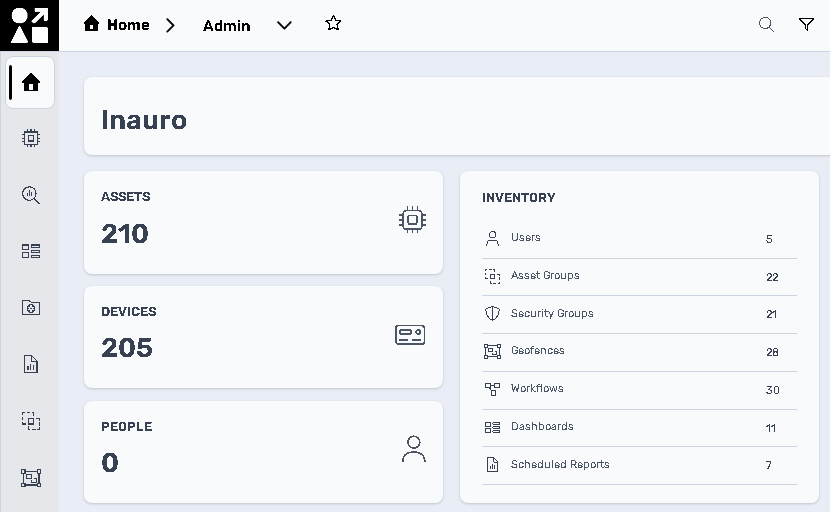
### 9. Done! After completing all the steps, you will be able to log into Perspio.
![](https://help.perspio.io/hs-fs/hubfs/image-png-May-12-2026-06-05-40-1691-AM.png?width=830&height=512&name=image-png-May-12-2026-06-05-40-1691-AM.png)


If you have any questions or need further assistance, please reach out to our Support Team via e-mail on [servicedesk@perspio.io](mailto:servicedesk@perspio.io).


- [Introduction](https://help.perspio.io/help/introduction?hsLang=en#main-content)


    - [How to's](https://help.perspio.io/help/introduction?hsLang=en#how-tos)
- [Assets](https://help.perspio.io/help/assets?hsLang=en#main-content)


    - [Asset Inspector](https://help.perspio.io/help/assets?hsLang=en#asset-inspector)
    - [Utilisation Module](https://help.perspio.io/help/assets?hsLang=en#utilisation-module)
    - [Configuration](https://help.perspio.io/help/assets?hsLang=en#configuration)
    - [Events](https://help.perspio.io/help/assets?hsLang=en#events)
    - [Servicing](https://help.perspio.io/help/assets?hsLang=en#servicing)
    - [Asset Configuration](https://help.perspio.io/help/assets?hsLang=en#asset-configuration)
    - [Device Configuration](https://help.perspio.io/help/assets?hsLang=en#device-configuration)
- [Explorer](https://help.perspio.io/help/explorer?hsLang=en)
- [Dashboards](https://help.perspio.io/help/dashboards?hsLang=en#main-content)


    - [Configuration](https://help.perspio.io/help/dashboards?hsLang=en#configuration)
- [Reports](https://help.perspio.io/help/reports?hsLang=en#main-content)


    - [Available Reports](https://help.perspio.io/help/reports?hsLang=en#available-reports)
- [Groups](https://help.perspio.io/help/groups?hsLang=en#main-content)


    - [Security Groups](https://help.perspio.io/help/groups?hsLang=en#security-groups)
    - [Asset Groups](https://help.perspio.io/help/groups?hsLang=en#asset-groups)
- [Geofences](https://help.perspio.io/help/geofences?hsLang=en)
- [Workflows](https://help.perspio.io/help/workflows?hsLang=en)
- [Administration](https://help.perspio.io/help/administration?hsLang=en#main-content)


    - [Settings Module](https://help.perspio.io/help/administration?hsLang=en#settings-module)
    - [Admin Panel](https://help.perspio.io/help/administration?hsLang=en#admin-panel)
- [Devices](https://help.perspio.io/help/devices?hsLang=en#main-content)


    - [Troubleshooting](https://help.perspio.io/help/devices?hsLang=en#troubleshooting)
    - [Installation Guides](https://help.perspio.io/help/devices?hsLang=en#installation-guides)

[![](https://help.perspio.io/hs-fs/hubfs/Perspio%20Logo%20%E2%80%93%20Colour%20White%20%E2%80%93%20large%20%20RGB.png?width=786&height=177&name=Perspio%20Logo%20%E2%80%93%20Colour%20White%20%E2%80%93%20large%20%20RGB.png)](https://perspio.io)

2/50 Yeo St, Neutral Bay NSW 2089

[mailto:servicedesk@perspio.io](mailto:servicedesk@perspio.io) <https://www.facebook.com/InauroAus/> <https://www.inauro.io/>

Copyright © 2026 Inauro