---
title: Groups Module Overview
description: "The Groups Module allows users to logically organise and manage their assets and user access. It is divided into two distinct types of groups: Asset Groups and Security Groups. Each serves a different purpose but operates within a similar visual framework for consistency and ease of use."
---
[Skip to content](https://help.perspio.io/help/groups-module#main-content)
English
Show submenu for translations

Open main navigation
Close main navigation
- English
Show submenu for translations
- [Contact us](mailto:servicedesk@perspio.io)
[Contact us](mailto:servicedesk@perspio.io)
How can we help you?
- There are no suggestions because the search field is empty.
1. [Perspio Help Centre](https://help.perspio.io/help?hsLang=en)
2. [Groups](https://help.perspio.io/help/groups?hsLang=en)
# Groups Module Overview
## The Groups Menu allows users to logically organise and manage their assets and user access. It is divided into two distinct types of groups: Asset Groups and Security Groups. Each serves a different purpose but operates within a similar visual framework for consistency and ease of use.
### Accessing the Groups Menu
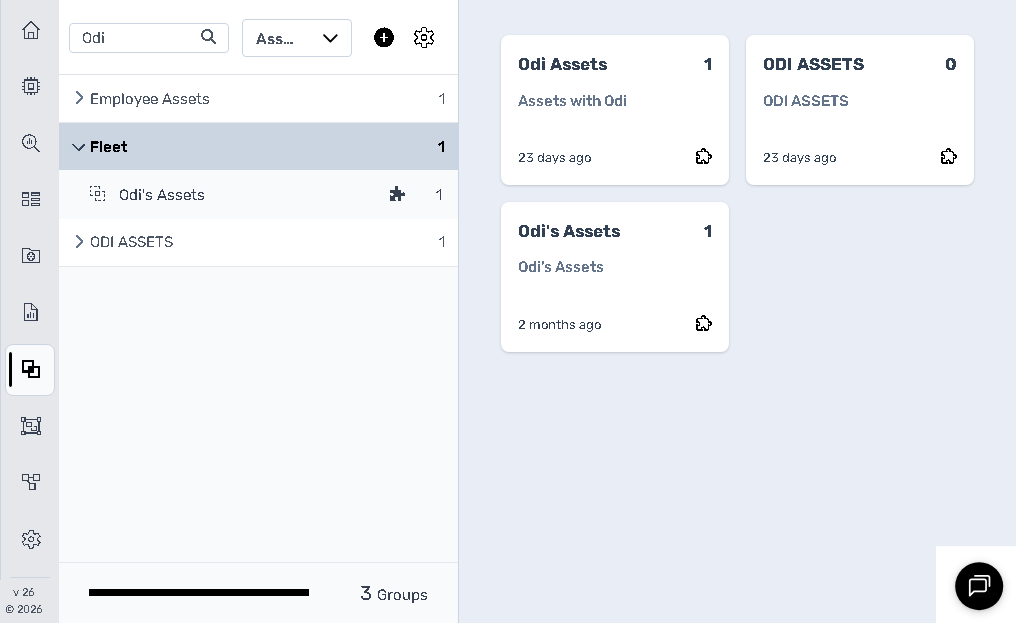
You can access the Groups Menu by clicking the icon on the left navigation bar that resembles a stacked squares layout. Once opened, you will see a list of groups sorted into categories on the left panel and visualised as cards on the right panel.
At the top of the left-hand pane, you will find:
- **Search groups** bar: Quickly locate any group by typing part of its name.
- **Group type dropdown**: Toggle between "Asset" and "Security" groups to filter the view.
---
### Asset Groups
**Asset Groups** are used to categorise and manage your assets. These may include vehicles, portable equipment, lighting units, delivery trucks, and more. Each card displays:
- **Group Name** (e.g., “Vehicle Fleet”).
- **Sub-label**: Often the same as the title or describing the asset category.
- **Asset Count**: Number of assets in the group.
- **Creation Date/Time.**
- **Edit Icon** (gear symbol): Click to adjust group settings.
### Use Cases for Asset Groups
- Segmenting fleets (e.g., “East Coast Assets” or “Compaction Fleet”)
- Creating region-specific or function-specific asset views.
- Facilitating filters in dashboards, reports, and workflows.
- Grouping assets with similar operational or maintenance profiles.
### Group Management Options
- **Add Group**: Button at the bottom left to create a new group.
- **Edit Group**: Accessed via the gear icon on each card.
- **View Assets in Group**: Clicking a card takes you to the list of assets within that group.
---
### Security Groups
**Security Groups** are used to manage **access control** for users. Unlike Asset Groups, these do not affect asset categorisation but define which users or roles can see and interact with specific data or functions within the platform.
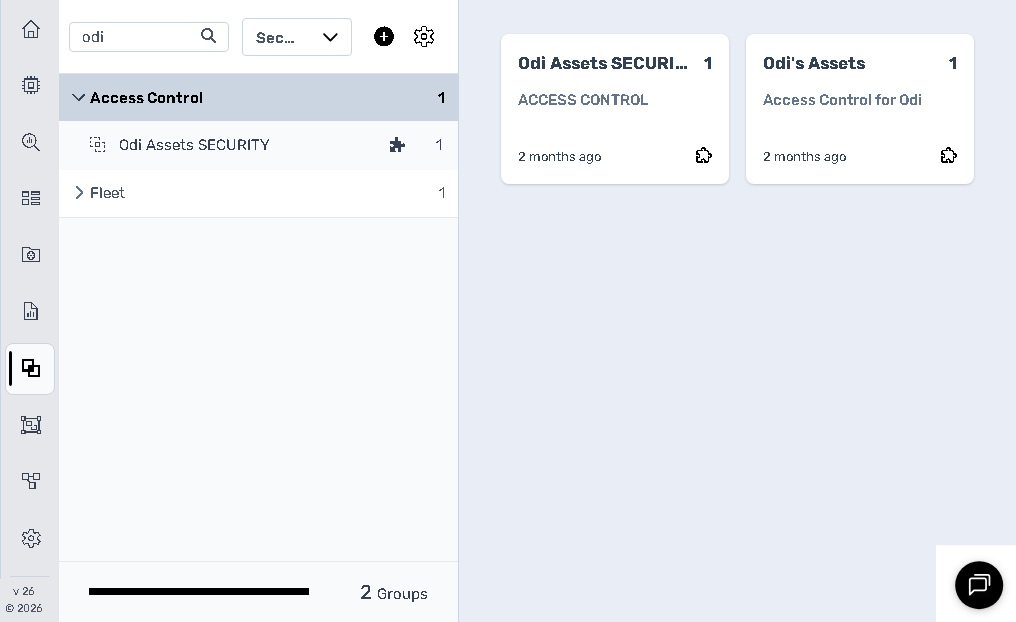
Each Security Group card includes:
- **Group Name** (e.g., “Insurance Investigation”).
- **Sub-label**: Often matches the title.
- **User or Asset Count**: Reflects how many members or restricted assets are associated.
- **Creation Date/Time.**
- **Edit Icon**: Manage permissions and access policies.
### Use Cases for Security Groups
- Granting a customer visibility only over their own assets.
- Restricting access to sensitive fleets (e.g., “Insurance Investigation” group).
- Controlling user permissions by location, business unit, or project.
---
### Summary: Asset vs. Security Groups
| Feature | Asset Groups | Security Groups |
| --- | --- | --- |
| **Purpose** | Organise assets into categories | Control user access |
| **Used For** | Reporting, filtering, dashboards | Permissions, access restriction |
| **Visibility** | Visible in operational interfaces | Affects data visibility |
| **Who Uses It** | Operations, Fleet Management | Administrators, Security Managers |
---
### Best Practices
- **Keep group names consistent and descriptive.**
- **Use Asset Groups for operational organisation.**
- **Use Security Groups to enforce data privacy and user-specific access.**
- **Review groups periodically to avoid clutter and misconfiguration.**
- [Introduction](https://help.perspio.io/help/introduction?hsLang=en#main-content)
- [How to's](https://help.perspio.io/help/introduction?hsLang=en#how-tos)
- [Assets](https://help.perspio.io/help/assets?hsLang=en#main-content)
- [Asset Inspector](https://help.perspio.io/help/assets?hsLang=en#asset-inspector)
- [Utilisation Module](https://help.perspio.io/help/assets?hsLang=en#utilisation-module)
- [Configuration](https://help.perspio.io/help/assets?hsLang=en#configuration)
- [Events](https://help.perspio.io/help/assets?hsLang=en#events)
- [Servicing](https://help.perspio.io/help/assets?hsLang=en#servicing)
- [Asset Configuration](https://help.perspio.io/help/assets?hsLang=en#asset-configuration)
- [Device Configuration](https://help.perspio.io/help/assets?hsLang=en#device-configuration)
- [Explorer](https://help.perspio.io/help/explorer?hsLang=en)
- [Dashboards](https://help.perspio.io/help/dashboards?hsLang=en#main-content)
- [Configuration](https://help.perspio.io/help/dashboards?hsLang=en#configuration)
- [Reports](https://help.perspio.io/help/reports?hsLang=en#main-content)
- [Available Reports](https://help.perspio.io/help/reports?hsLang=en#available-reports)
- [Groups](https://help.perspio.io/help/groups?hsLang=en#main-content)
- [Security Groups](https://help.perspio.io/help/groups?hsLang=en#security-groups)
- [Asset Groups](https://help.perspio.io/help/groups?hsLang=en#asset-groups)
- [Geofences](https://help.perspio.io/help/geofences?hsLang=en)
- [Workflows](https://help.perspio.io/help/workflows?hsLang=en)
- [Administration](https://help.perspio.io/help/administration?hsLang=en#main-content)
- [Settings Module](https://help.perspio.io/help/administration?hsLang=en#settings-module)
- [Admin Panel](https://help.perspio.io/help/administration?hsLang=en#admin-panel)
- [Devices](https://help.perspio.io/help/devices?hsLang=en#main-content)
- [Troubleshooting](https://help.perspio.io/help/devices?hsLang=en#troubleshooting)
- [Installation Guides](https://help.perspio.io/help/devices?hsLang=en#installation-guides)
[](https://perspio.io)
2/50 Yeo St, Neutral Bay NSW 2089
[mailto:servicedesk@perspio.io](mailto:servicedesk@perspio.io)
Copyright © 2026 Inauro